Tool Calling vs Pure Vision in Computer-Use Agents
Hybrid agents need both approaches—each covers failures the other can't fix alone.
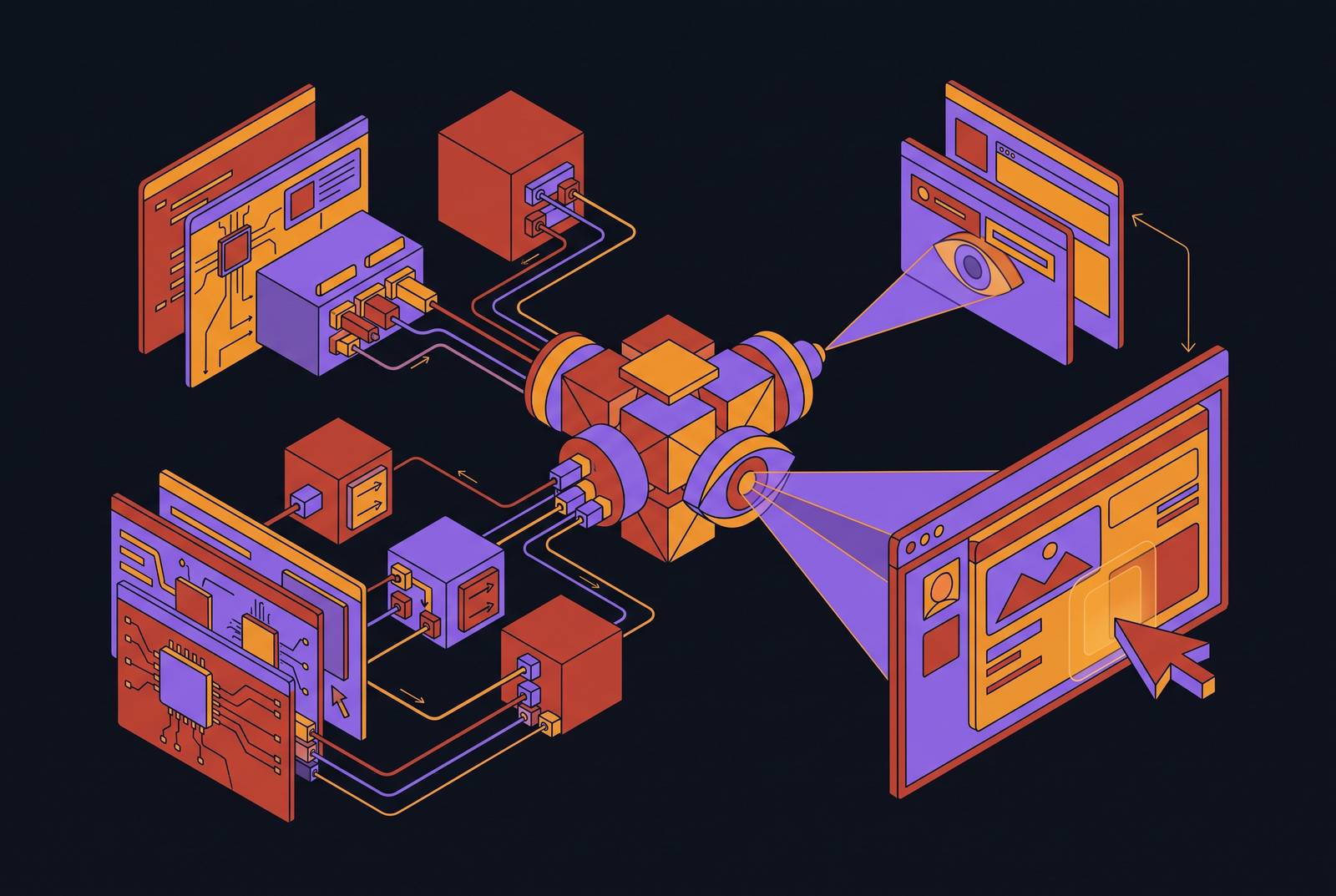
A staff member logging into a payer portal to check prior authorization status has no API to call. The screen is the only interface available, and an agent working that task has to look at it, find the right button, and click, the same way a person would. That single scenario captures the entire architectural tension this piece is about: computer-use agents have exactly two ways to act on software, drive the GUI through screenshots and pixel-level clicks, or call text-level tools such as MCP servers, CLIs, and agent skills, and each of these routes carries a fundamentally different cost and reliability profile. Neither is a stylistic preference. Each is a distinct technical commitment with its own economics.
The GUI route earns its keep through generality. It works on any application, any screen, any system, without an integration project, because the agent sees what a human would see and acts on that basis. That is what makes it the default fallback for legacy portals, internal admin consoles, and desktop software nobody ever built an API for. The tool-calling route trades that generality for precision and low cost: a structured call returns a structured result without touching a single vision token, but it only exists where somebody has already built and exposed the tool. Research on hybrid GUI-MCP agents out of Xiaohongshu and Renmin University frames the economic logic clearly: every screenshot kept or dropped in a multi-turn session is a cost decision as well as a behavioral one, because screenshots dominate the token budget.
The two routes are not interchangeable, and neither can fully absorb the other's job. Roughly a quarter of tasks are tool-unreachable and demand pixels no matter what, CAPTCHAs, slide recoloring, and heavy in-browser interaction among them. That leaves a persistent floor beneath which vision cannot be replaced by tools, and a large remaining territory where tools are available but not automatically used. The real question an agent faces at every step is not whether to replace screenshots with tool calls, but when to use each. Everything that follows in this piece works out the consequences of that question, first by showing why each route fails on its own, then by showing how the strongest agents now decide between them in real time.
Why pure vision breaks down under real workload conditions
Vision is the most general capability a computer-use agent has, and also the most expensive one to run at scale. Three failure modes compound on any task long enough to matter: each frame consumes vision tokens, visual history keeps growing across turns, and screen coordinates go stale the moment the interface changes. None of these problems is fatal in isolation. Compounded across dozens of steps, the cost curve turns steep quickly.
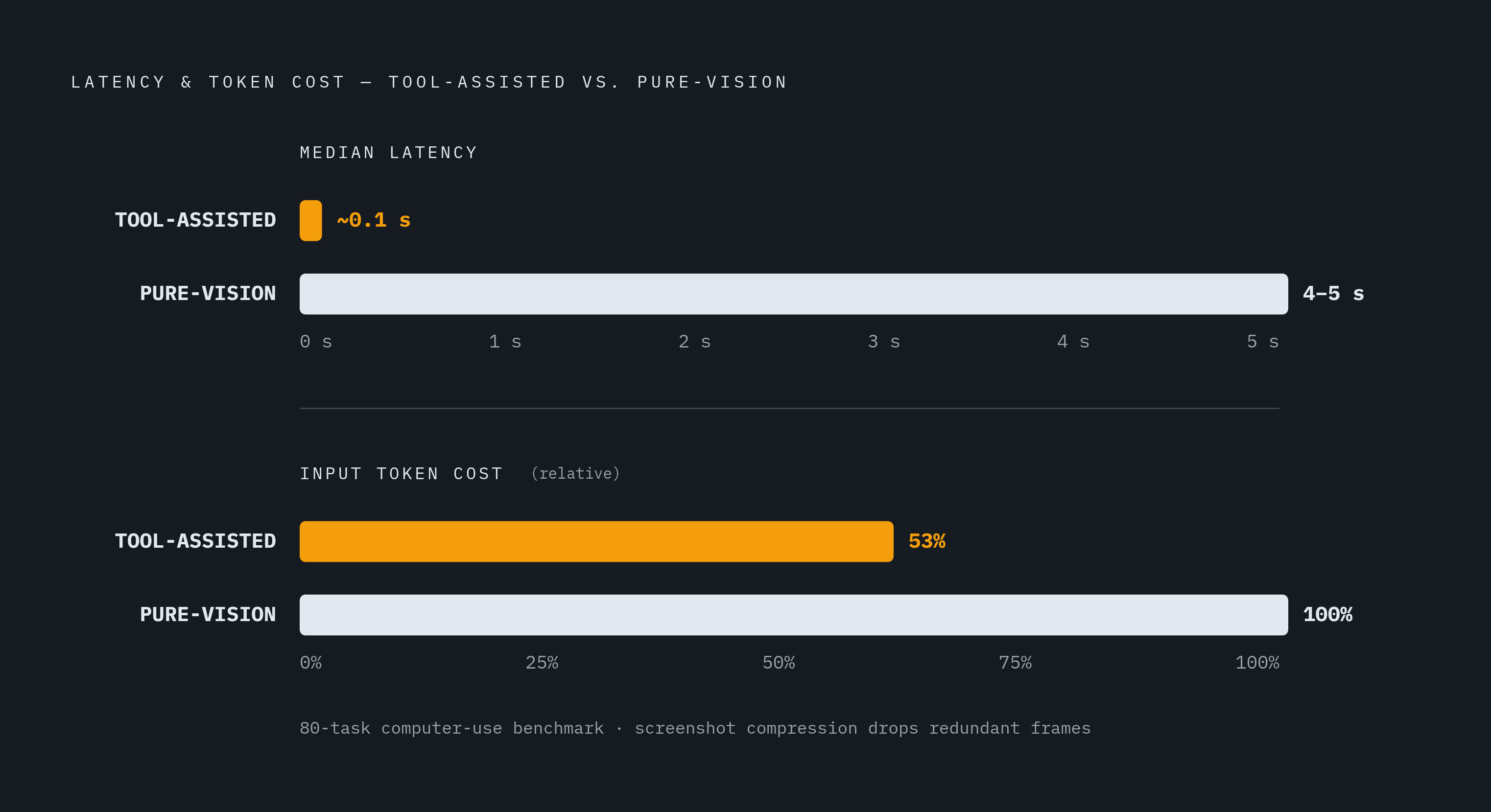
The hybrid GUI-MCP research quantifies how steep. Dropping redundant screenshots taken right after a successful tool call, and halving the image history an agent carries forward, cuts input tokens by roughly a third. The small accuracy cost that this compression introduces disappears entirely once the agent is retrained under the same observation rule, at which point the compressed agent outperforms the uncompressed one while spending a fraction of the input cost. That is a direct demonstration that raw visual fidelity was never the source of the accuracy, and that much of what a pure-vision agent carries around is waste it never needed to pay for.
Latency tells the same story from a different angle. On an 80-task computer-use test reported in the same research, a tool-assisted path achieves roughly 0.1-second median latency where a pure-vision path takes 4 to 5 seconds, a gap that matters when a workflow involves dozens of sequential steps across payer portals and EHR screens. Multiplied across a workflow with dozens of sequential steps spanning payer portals and EHR screens, that gap means a workflow finishes in minutes instead of an hour.
Brittleness adds to the expense rather than sitting apart from it. Classic RPA, the prior generation of GUI automation, breaks whenever the underlying interface changes, because it relies on selectors recorded once by a developer and never revisited. A pure-vision LLM agent handles interface drift far better, since it re-grounds itself from a fresh screenshot at every step rather than trusting a static reference. But that adaptability is bought at a price: the agent pays the full visual grounding cost on every single step, with no way to skip work it has effectively already done. The 2026 computer-use agent guide draws this contrast explicitly between OS-level and browser-level agents, noting that OS-level agents run slower per step and carry a higher token cost precisely because screenshots are their primary channel of observation. None of this argues against computer-use agents as a category. It argues against treating vision as the only tool in the box, and it sets up the obvious next question: if pure vision is too expensive and too brittle to run at scale on its own, what does a production agent need instead?
Why pure tool calling is also incomplete
Tool calling looks, on paper, like the clean answer to everything vision gets wrong: cheap, precise, no stale coordinates. In practice it fails in its own ways, and those failures are just as structural as vision's. The first is an availability gap. Tools exist only where a developer has built and exposed them, and large parts of enterprise software, legacy portals, and healthcare-specific systems simply have no MCP server or equivalent. An agent facing one of those systems has no structured path at all, even in cases where a structured path would have been far cheaper to run.
The second failure is an adoption gap, visible even where tools are technically available. The hybrid agent research finds that a reasoning model that genuinely benefits from tool access still calls one on fewer than one task in five among tool-reachable tasks. On VLC specifically, where the majority of tasks are tool-reachable, the same model calls none at all. Someone still has to build and inject that tool server, paying its full engineering cost, while most of its potential benefit goes unrealized because the model never reaches for it.
Non-reasoning models make the picture worse rather than better. The same MCP tools that measurably help a reasoning model also actively degrade a non-reasoning model's accuracy, because the non-reasoning policy ignores the tools, misnames them, or falsely terminates a task around them. Giving a model access to a tool is not the same as giving it the judgment to use that tool correctly, and the gap between those two things varies by model architecture in ways that a simple tool-availability count will never reveal.
A third failure sits deeper in the scale of the model itself. MM-ToolSandBox, an Apple evaluation spanning hundreds of tools and application domains, found that even the best model tested scores below 50% success on visual tool-calling tasks. The research identifies a planning-to-precision crossover: smaller models fail mainly at deciding what to do next, while larger models fail mainly at perceiving what is actually on screen. The bottleneck does not vanish as models scale up, it just moves to a different part of the pipeline.
A perceptual blind spot produced by all three failures is one that tool calling can never close on its own. A tool call returns a text result, with no visual confirmation attached, so the agent cannot know whether the action actually produced the expected screen state unless it separately takes a screenshot to check. A pure tool-calling agent cannot verify its own outcomes on any task where the outcome is visual. In healthcare administration this is not an academic concern: payer portals vary widely in whether they expose a structured submission path, and a great many require portal navigation with no API equivalent at all, which means a tool-only agent simply cannot finish those tasks, full stop on the mechanism, not on the effort.
How hybrid agents decide which route to take
Once both pure strategies are understood as incomplete in complementary ways, the interesting engineering question is how an agent decides, step by step, which one to use. That decision operates at two distinct levels at once: an action level, which asks whether to click through pixels or call a text tool for the step directly in front of the agent, and a context level, which asks, once a tool call has already succeeded, whether the following screenshot should be kept or discarded in favor of the textual result.
Work on the action-level problem has produced measurable gains. Alibaba's Tongyi Lab built ToolCUA, published in May 2026, around a staged training pipeline designed specifically to teach an agent when to switch from GUI actions to tool calls. On OSWorld-MCP, that approach delivers a relative improvement of roughly 66% over baseline and outperforms GUI-only configurations outright. The gain does not come from a better tool or a bigger model, it comes from training the decision itself, treating "should I use a tool here" as a skill to be learned rather than a rule to be hardcoded.
The context-level problem is more subtle and, in some ways, more revealing. The hybrid GUI-MCP research shows that a successful tool call very often makes the screenshot that follows it redundant, and yet untrained agents take that screenshot anyway, out of habit rather than need. Retraining the agent under a compressed observation rule that drops those redundant screenshots removes the accuracy cost that compression might otherwise introduce, and produces an agent that is strictly better while running at lower input cost. That result carries an important distinction: behavior toward tools is steerable through reinforcement learning, but competence with those tools is not automatically produced by the same steering. A dense tool-use bonus can raise tool adoption from near-zero to a meaningful rate, and that shift carries through into greedy decoding at inference time, but held-out task accuracy does not improve in step. Pushing a model toward a tool teaches it to reach for the tool more often. It does not by itself teach the model to integrate what that tool returns.
Two further efforts show what happens when the routing decision gets folded into the model itself rather than bolted on after the fact. MintAct, an Apple release from September 2026, unifies UI grounding, multi-step navigation across mobile, desktop, and web, and visual tool use inside a single model trained through a multi-stage recipe, scoring 48.9 on OSWorld-Verified and demonstrating that one model can handle the routing decision across all three capability types without degrading on any of them. Yutori's Navigator n2 shows the same idea applied as a runtime policy rather than a training objective: it self-reports switching between Chrome tooling and full computer use depending on which path is cheaper for the task step in front of it, turning cost-based routing into an explicit, observable decision the agent makes on the fly.
A third approach attacks the problem from outside the model. The justification for that gatekeeping is blunt: most tool calls made by a baseline agent either leave the model's prediction unchanged or actively make it worse, so skipping the unnecessary ones costs nothing in accuracy and saves real money in tokens.
What benchmark scores reveal about routing quality
A high score on OSWorld or a comparable benchmark tells you that an agent finished its tasks. It tells you almost nothing about how it got there. An agent can post a strong result while taking the expensive path on every single step. Benchmark scores alone cannot distinguish a genuinely well-orchestrated hybrid agent from a brute-force vision agent that simply threw enough tokens and time at the problem. The 2026 computer-use agent guide adds a second caution: OSWorld scores are highly sensitive to step budget and number of runs, so a score reported under a generous step budget may bear little resemblance to how that same agent behaves under the latency and cost constraints of a production environment.
Each frame consumes vision tokens, visual history grows over turns, and coordinates become stale when the interface changes, three compounding failure modes that hit simultaneously on longer tasks. OSWorld and OSWorld-Verified cover 369 real desktop tasks across Chrome, VS Code, GIMP, LibreOffice, Thunderbird, and VLC, plus multi-app flows, all run inside a full Ubuntu VM. WebArena and VisualWebArena test long-horizon planning and recovery on self-hosted site clones. WebVoyager runs hundreds of tasks on live public websites, judged by a vision model. None of the three was built to represent a healthcare administrative workload, and none of them measures routing efficiency as a distinct axis from task completion.
MM-ToolSandBox's 2026 evaluation surfaces a failure pattern that task-success scoring hides almost entirely: 53% of failures among otherwise correct task workflows trace back to incorrect information extraction from images, not to any error in the plan itself. Visual precision, not planning, turns out to be the bottleneck for models that already know what to do. HealthAdminBench, a 2026 benchmark purpose-built for this domain, evaluates end-to-end prior-authorization, appeals, and equipment-order workflows across an EHR, payer portals, and a fax system, using fine-grained deterministic checkpoints alongside overall task success. That combination gives operators a more honest signal than a general-purpose benchmark ever could. The practical upshot for anyone evaluating an agent for healthcare operations is that task success on a general benchmark is a weak proxy on its own. The sharper questions are whether the agent routes to a tool when one is available, whether it keeps taking unnecessary screenshots after a tool call has already succeeded, and whether it can carry a workflow across the EHR, the payer portal, and any other interface involved without an API tying the whole thing together.
Why healthcare's administrative environment makes the routing decision consequential
Healthcare administration runs across a mix of systems, payer portals, fax machines, and third-party clearinghouses, where tool availability shifts sharply from payer to payer and system to system. Dynamic routing between vision and tools is a basic requirement for finishing the work, not an optimization an agent can skip.
Prior authorization makes the case most clearly. A PA request can move through a payer's web portal or through a direct API, but since not every payer supports both submission methods, an agent locked into a single route, pure GUI or pure API, fails outright on a meaningful share of the payer mix it has to work across. Regulation is narrowing that gap without closing it. The CMS Interoperability and Prior Authorization Final Rule (CMS-0057-F) requires impacted payers to implement a FHIR-based Prior Authorization API, along with three other FHIR APIs, by January 1, 2027, with operational prior authorization requirements, faster decision timeframes and denial-reason disclosure, having taken effect January 1, 2026. That expands the tool-reachable share of the PA workflow over time, but it does nothing to eliminate portal-only interactions in the meantime, or for payers that fall outside the mandate's scope.
The manual version of this workflow shows what routing actually replaces. Traditional PA work required staff to identify that an authorization was needed, find the right payer form, gather the clinical documentation, fill the form out by hand, fax or upload it through the payer's portal, wait days for a response, and follow up repeatedly until something moved. An agent that can move between portal navigation and structured API submission as the payer allows compresses or removes most of those steps outright. One health system documented a claims appeals process that used to take 15 to 16 days under manual nurse review, cut down to one to two days using an AI agent that reads denial letters and assembles the corrected documentation. That result depends on exactly the combination this piece has been describing: the agent has to read the denial letter visually, then act through structured documentation assembly, and neither half of that sequence works without the other.
Enterprise systems already reflect this logic at the workflow level, even where they are not framed in these terms. Tools that blend rules intelligence with both portal navigation and EDI automation to compress PA turnaround are, in effect, running the same hybrid decision that this piece has traced through research and benchmarks. Computer-use agents reach these multi-system workflows the way a staff member would, reading screens, clicking, typing, navigating, without requiring an API integration project or an EHR overhaul first. The routing decision carries so much weight here because the agent has to be able to switch to a structured call the moment a payer supports one, and fall back to vision the moment it does not, across a payer mix that will not standardize on its own timeline.
Hybrid Orchestration in a Deployed Agent
A production-grade hybrid agent never treats vision and tool calling as competing strategies to pick between once and commit to. It runs a continuous routing policy that selects the cheaper or more reliable path at every step, compresses its context the moment a tool result makes a screenshot redundant, and falls back to vision automatically whenever no tool exists for the task in front of it. The Xiaohongshu and UESTC research found that the compressed agent runs at 53% of the input cost of the uncompressed version, without giving up the accuracy that justified taking screenshots in the first place.
An agent should be held to that standard in healthcare administration and anywhere else the same patchwork of APIs and legacy portals shows up, because that administrative environment makes high-volume workflows especially unforgiving of a poorly made routing decision. The routing decision, made well at both the action level and the context level, is what turns two incomplete strategies into one that actually holds up under the volume and variety of real operational work.
Sources
- Screenshots or Tools? Eliciting Tool Use and Managing Multimodal Context in Hybrid GUI-MCP Computer-Use Agents
- MintAct: A Unified Visual Agent for Digital Environments
- MM-ToolSandBox: A Unified Framework for Evaluating Visual Tool-Calling Agents
- The Best Computer Use Agents in 2026: A Complete Guide to AI That Operates Your Computer
- ToolCUA: Towards Optimal GUI-Tool Path Orchestration for Computer Use Agents